Watch Teşkilat Episode 194 (Season 7 Episode 10) With English Subtitles
Tuğrul Surrenders to Ulak to Save His Team - Teşkilat Episode 194 with English Subtitles
Full HD version below. Enjoy!
Watch Teşkilat Episode 194 (Season 7 Episode 10) with English Subtitles – Tuğrul Surrenders to Ulak to Save His Team
“Either we live together. Or we die together.”
Tuğrul has one card left, and he plays himself. In Episode 194 of Teşkilat (known internationally as The Shadow Team), the Chairman walks unarmed into Ulak’s hands so Altay and the team can go free. He trusts only the ring on his finger to be traced. It’s a bold opening move. The Cartographers already have their answer ready.
A ring, a jammer and a team that won’t leave
Tuğrul’s order is clear: Ulak takes him, the team walks out. Altay disobeys it and chooses voluntary captivity instead. Ulak blindfolds the Chairman, switches vehicles and keeps a jammer running, but Uzay still picks up a steady signal from a forest outside Istanbul. Meanwhile he works on Barlas, who hands over two clues without meaning to: the team and the Chairman aren’t in France, and Tuğrul can be tracked. A metal factory six kilometers from where Bahar found the ring becomes the target. Azra’s single, precise shot there saves Altay, but Viktor, Ulak and Şahin escape and take Azra with them.


 Connect with us on SOCIAL MEDIA to catch up on the latest updates and be part of our growing community!
For any issues, please check our FAQ
Check if you have issues on all your devices (phone, tablet, laptop, PC…) or just your TV.
Different manufacturers (Samsung, LG and others) have different operating systems on which their TV’s run. Samsung uses Tizen while LG has webOS and they are not up to date with the latest standards in video playback.
That’s why we developed a player which supports casting feature.
If the video is playable on your other devices, try casting it to your TV.
In some cases casting icon doesn’t show up on the lower edge of the player to iPhone/iPad owners.
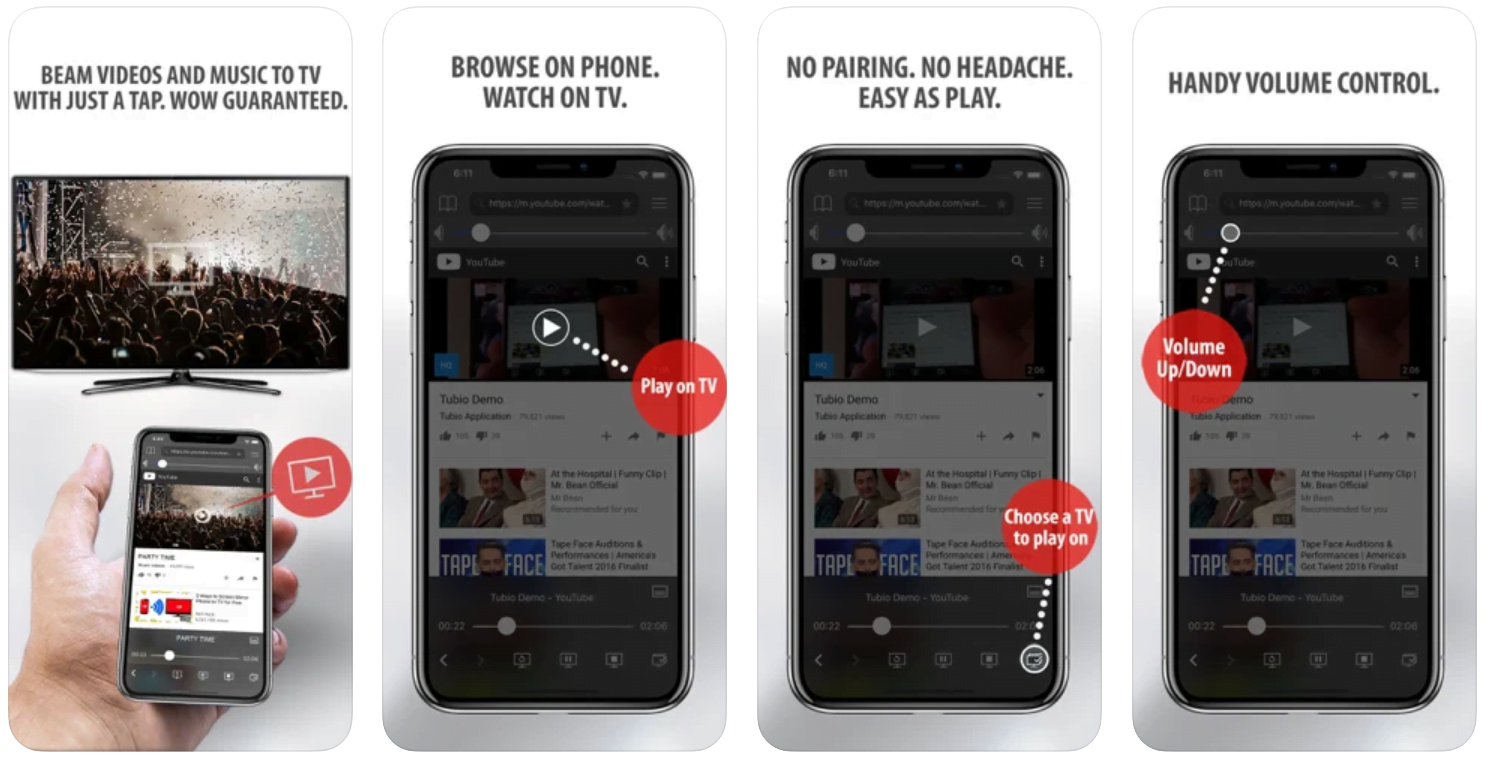
If you face such an issue, we recommend using Tubio app. It’s free and you can download it from App Store by clicking this link.
With it, you can cast any video from your iPhone/iPad to your TV.
Yes it does! Our new player supports casting feature so you can easily cast the video from your phone/tablet/laptop or PC to your TV
Video casting is a feature which allows you to send (or cast) a video from your phone, tablet, laptop or a PC to your Smart TV or other Cast-enabled device (such as Smart TV’s, Chromecast and other devices with cast functionality).
It makes watching a video on your TV very convenient because you don’t have to use your TV’s browser (which are often not very user friendly) to find the video and play it on your TV.
Insted, you simply:
- find it on your phone, tablet, laptop or a PC,
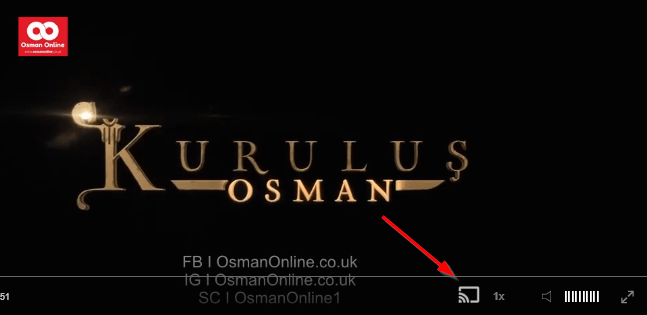
- click ‘Cast’ button (image below) on the lower edge of the video,
- select a TV to which you want to send the video
and video playback will start on your TV.
Note: Your TV and your phone, tablet, laptop or a PC need to be on the same network. It’s usually the case at home but, for example, if your phone is on mobile network and your TV is connected to your home network, casting button won’t show up on your phone because your phone doesn’t “see” your TV because they are not on the same network. In which case, simply connect your phone to your home network and reload the browsers page where the player is.
Clear cookies, clear cache, try a different browser.
Here’s a handy guide for most browsers.
Try using a different network. For example, if you have issues on your home network, you can try using your phone and it’s mobile network, in which case, your ISP is blocking the access to the video so maybe you should consider switching ISPs or using a VPS service.
Korkut hacks France while Altay faces the signing table
The state wants a chief until Tuğrul returns, and Korkut gets the chair. His first job is a trip to France with Uzay, Defne, Cihan, Zülküf and Hamdi to retake the internet. They do, and they find a live feed. Ulak is playing a longer game, though. Her demand is that Türkiye withdraw from the EU security agreement before sunset, or Tuğrul dies. Altay stalls, accepting her terms to buy time. Korkut’s team rushes to the feed’s source and finds the Chairman isn’t there. At the signing table, the Cartographers are ahead, and Altay has to decide what the signature costs.
Mini FAQ
Why does Tuğrul give himself up to Ulak in Teşkilat Episode 194?
Ulak is holding Altay and the team, and Tuğrul offers himself in exchange for their release. He expects his ring to let Uzay and the team find him.
What does Ulak demand from Altay in Episode 194?
She demands that Türkiye announce its withdrawal from the EU security agreement on camera, or she will kill the Chairman. She gives them until sunset.
Where can I watch Teşkilat Episode 194 with English subtitles?
You can watch it with English subtitles on osmanonline.live, on the page for this episode.
Watch all episodes of Teşkilat with English subtitles on OsmanOnline.live.
For more Turkish series like this, visit osmanonline.live to watch, and explore fascinating historical tales at osmanonline.me.