
Watch Mevlana Celaleddin Rumi Episode 30 (Season 3 Episode 10) With English Subtitles
Mevlana Celaleddin Hears the Secret of the Moth – Mevlana Celaleddin Rumi Episode 30 with English Subtitles
Full HD version below. Enjoy!
Watch Mevlana Celaleddin Rumi Episode 30 (Season 3 Episode 10) with English Subtitles – Mevlana Celaleddin Hears the Secret of the Moth
“You’re a moth, Celaleddin.”
Episode 30 of Mevlana Celaleddin Rumi is a quiet and heavy hour built around parting. Celaleddin asks the dervish who guides him about a man once lying in that place and about who was pulled from the well, and he hears a lesson about veils, titles and the road ahead. Alaaddin accepts a post at the palace, Celaleddin comforts Bahaeddin, and the idea of writing takes shape. Here is a spoiler-light look at the episode.
The Moth and the Fire
The episode opens with Celaleddin in tears over a place where a man once lay. The dervish tells him he is a moth and recalls how Celaleddin’s father, Sultanu’l-ulema Bahaeddin Veled, first spoke of a moth that is drawn to a fire and may have to burn to reach it. Hallac-i Mansur is named in connection with that secret. The dervish says he has never seen another dervish who burned with love and still asked for more. He promises that Celaleddin’s ghazels will travel the world, even if some people never understand them.
Alaaddin, Anger and the Palace
Alaaddin accepts a post at the palace, and a conversation about what the palace is like turns into talk of brotherhood. Celaleddin then asks the dervish why there is animosity between his son Alaaddin and the dervish. The answer is that Alaaddin carries a selfness cause and an anger that eats him alive, while the dervish has no cause but Allah’s. He names Bahaeddin as Alaaddin’s opposite. When Bahaeddin asks his father how to cure a feeling of inadequacy, Celaleddin answers with the words La Tahzen, do not be sad.


 Connect with us on SOCIAL MEDIA to catch up on the latest updates and be part of our growing community!
Terms used in this episode
- Derviş member of a Sufi order
- Sultan sovereign ruler
- Çelebi gentleman, cultivated man
- Efendi sir, master
- Eyvallah thank you / so be it / agreed
- Helal lawful / forbidden
- Şeyh spiritual leader of a Sufi order
For any issues, please check our FAQ
Check if you have issues on all your devices (phone, tablet, laptop, PC…) or just your TV.
Different manufacturers (Samsung, LG and others) have different operating systems on which their TV’s run. Samsung uses Tizen while LG has webOS and they are not up to date with the latest standards in video playback.
That’s why we developed a player which supports casting feature.
If the video is playable on your other devices, try casting it to your TV.
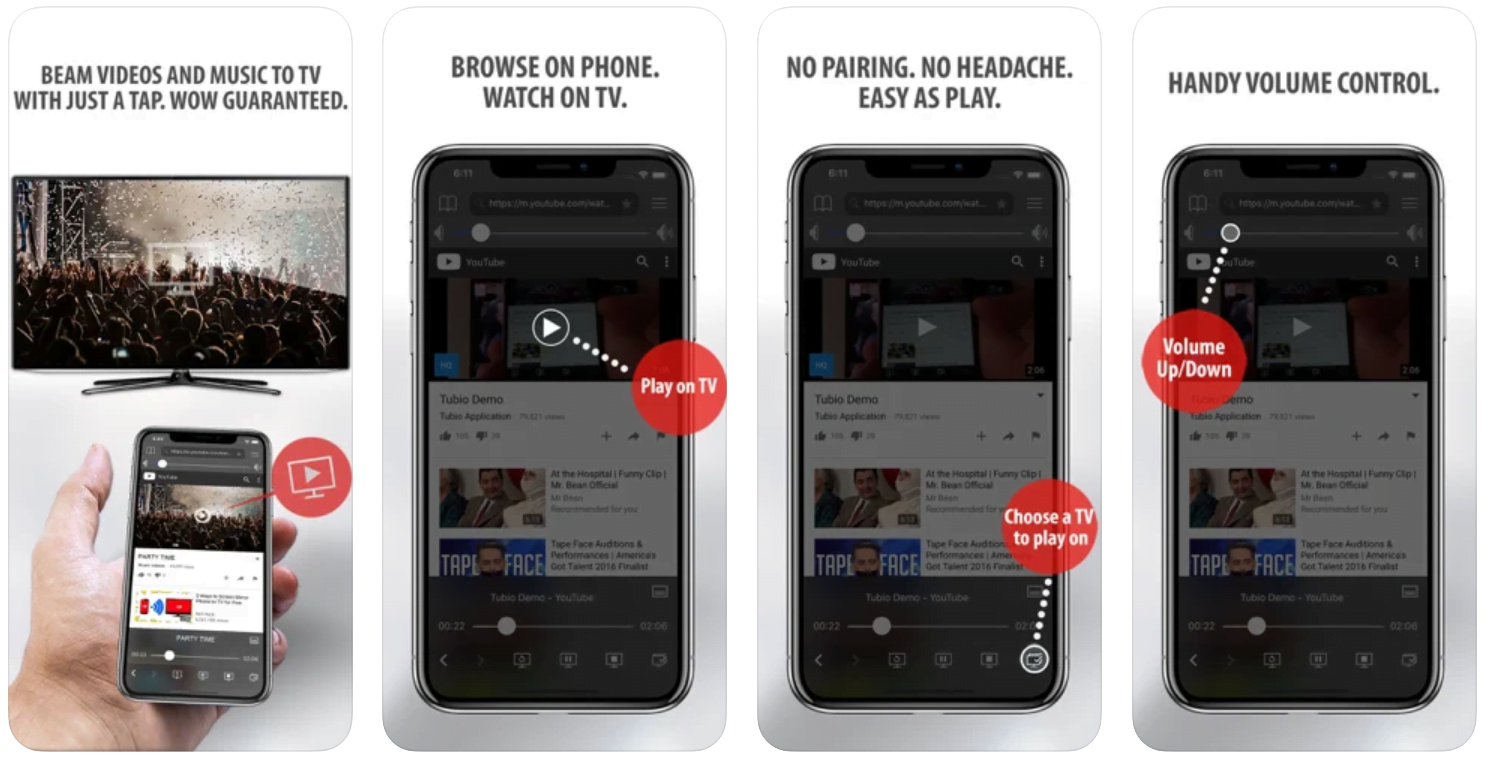
In some cases casting icon doesn’t show up on the lower edge of the player to iPhone/iPad owners.
If you face such an issue, we recommend using Tubio app. It’s free and you can download it from App Store by clicking this link.
With it, you can cast any video from your iPhone/iPad to your TV.
Yes it does! Our new player supports casting feature so you can easily cast the video from your phone/tablet/laptop or PC to your TV
Video casting is a feature which allows you to send (or cast) a video from your phone, tablet, laptop or a PC to your Smart TV or other Cast-enabled device (such as Smart TV’s, Chromecast and other devices with cast functionality).
It makes watching a video on your TV very convenient because you don’t have to use your TV’s browser (which are often not very user friendly) to find the video and play it on your TV.
Insted, you simply:
- find it on your phone, tablet, laptop or a PC,
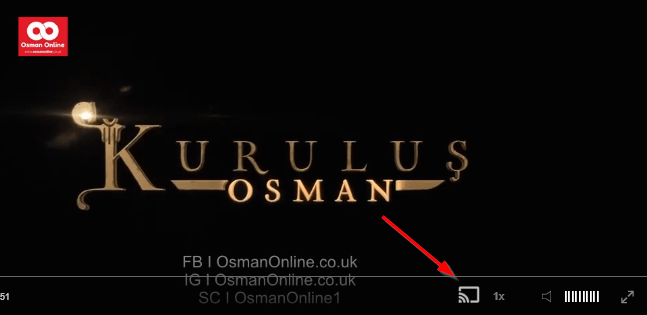
- click ‘Cast’ button (image below) on the lower edge of the video,
- select a TV to which you want to send the video
and video playback will start on your TV.
Note: Your TV and your phone, tablet, laptop or a PC need to be on the same network. It’s usually the case at home but, for example, if your phone is on mobile network and your TV is connected to your home network, casting button won’t show up on your phone because your phone doesn’t “see” your TV because they are not on the same network. In which case, simply connect your phone to your home network and reload the browsers page where the player is.
Clear cookies, clear cache, try a different browser.
Here’s a handy guide for most browsers.
Try using a different network. For example, if you have issues on your home network, you can try using your phone and it’s mobile network, in which case, your ISP is blocking the access to the video so maybe you should consider switching ISPs or using a VPS service.
A Path to Write and a Question About Titles
The dervish urges Celaleddin to write about the path he walks, for those who hope to climb out of the well like Yusuf with the rope of love. Celaleddin doubts himself next to Attar and Senai, but he is shown a single drop of water and told how drops gather into a stream. A question about whether Bayezid-i Bistami or Prophet Muhammad is greater is also answered, with a point about never being satisfied with a title. Then the dervish says his time is up, and the episode heads toward a closing request that is best left for you to watch.
Mini FAQ
What is the moth parable in Mevlana Celaleddin Rumi Episode 30?
The dervish tells Celaleddin he is a moth and recalls his father Bahaeddin Veled’s story of a moth that loves a fire and may need to burn to reach it.
Why is there animosity between Alaaddin and the dervish in Episode 30?
The dervish says Alaaddin has a selfness cause and an anger that consumes him, while the dervish has no cause but Allah’s, so the two collide.
Where can I watch Mevlana Celaleddin Rumi Episode 30 with English subtitles?
You can watch Episode 30 with English subtitles on osmanonline.live.
Watch all episodes of Mevlana Celaleddin Rumi with English subtitles on OsmanOnline.live.
For more Turkish series like this, visit osmanonline.live to watch, and explore fascinating historical tales at osmanonline.me.