
Watch Vefa Sultan Episode 21 (Season 1 Episode 21) With English Subtitles
Vefa Sultan Rebuilds After the Sferaki Lodge Fire – Vefa Sultan Episode 21 with English Subtitles

Watch Vefa Sultan Episode 21 (Season 1 Episode 21) with English Subtitles – Vefa Sultan Rebuilds After the Sferaki Lodge Fire
“Did they burn our hopes too?”
In Episode 21 of Vefa Sultan, the dervish lodge in Sferaki goes up in flames, yet Sheik Vefa refuses to retreat. The Pasa and Deliormanli begin searching for whoever set the fire, while Vasily and his uncle plan to sow discord during Ramadan. Meanwhile the dervishes begin their first Ramadan on their new road, and Vefa searches for a shop to sell books. Read the full recap below.
The Fire and Vefa’s Answer
The episode opens with the lodge on fire. The dervishes stay together and pray as the flames rise, and Vefa leads them out. Afterward he asks whether the fire burned their hopes too, and he reminds them how the Prophet treated the people of Taif. His answer to the wrong done to them is love, not revenge. Elsewhere, Vasily and his uncle talk about the blaze as a clean job that left no trace. Asim’s family decides to stay and helps the dervishes, while Andreas’s mother objects to his loyalty to the Muslims.
The Search for the Culprits
The Pasa tells Haci that the fire cannot be a coincidence and that it may be linked to the kidnapping of the Sheik in Rhodes. Still, he insists on acting only with evidence. He orders Deliormanli to find the perpetrators and to increase the measures, but quietly, since Vefa dislikes seeing soldiers around him. Deliormanli is told to have a shadow, but not a body. Hristos reports that Vefa is rebuilding with help from fellow believers. A police officer even asks a doctor whether anyone has come for burn ointment.


 Connect with us on SOCIAL MEDIA to catch up on the latest updates and be part of our growing community!
Full HD version bellow. Enjoy!
For any issues, please check our FAQ
Check if you have issues on all your devices (phone, tablet, laptop, PC…) or just your TV.
Different manufacturers (Samsung, LG and others) have different operating systems on which their TV’s run. Samsung uses Tizen while LG has webOS and they are not up to date with the latest standards in video playback.
That’s why we developed a player which supports casting feature.
If the video is playable on your other devices, try casting it to your TV.
In some cases casting icon doesn’t show up on the lower edge of the player to iPhone/iPad owners.
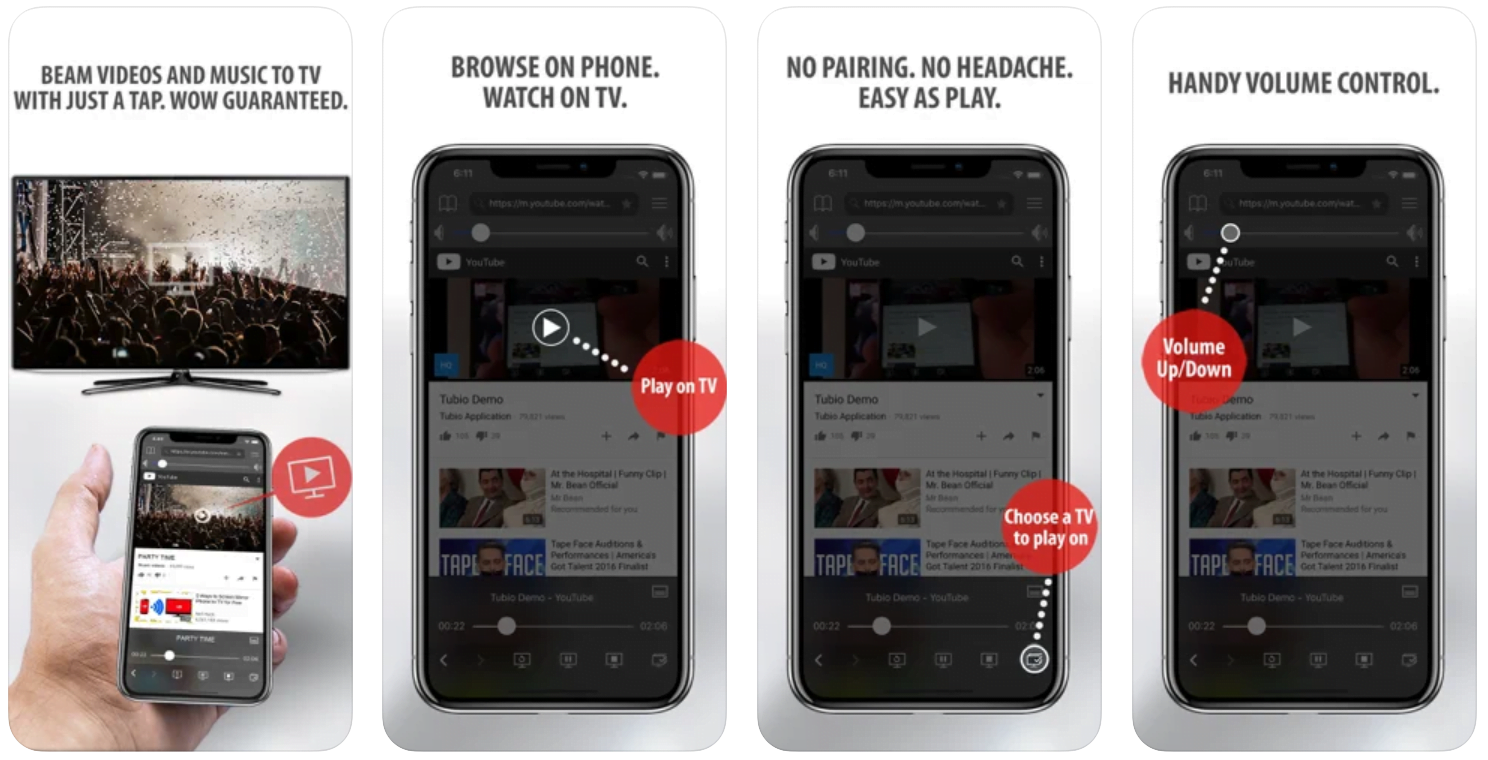
If you face such an issue, we recommend using Tubio app. It’s free and you can download it from App Store by clicking this link.
With it, you can cast any video from your iPhone/iPad to your TV.
Yes it does! Our new player supports casting feature so you can easily cast the video from your phone/tablet/laptop or PC to your TV
Video casting is a feature which allows you to send (or cast) a video from your phone, tablet, laptop or a PC to your Smart TV or other Cast-enabled device (such as Smart TV’s, Chromecast and other devices with cast functionality).
It makes watching a video on your TV very convenient because you don’t have to use your TV’s browser (which are often not very user friendly) to find the video and play it on your TV.
Insted, you simply:
- find it on your phone, tablet, laptop or a PC,
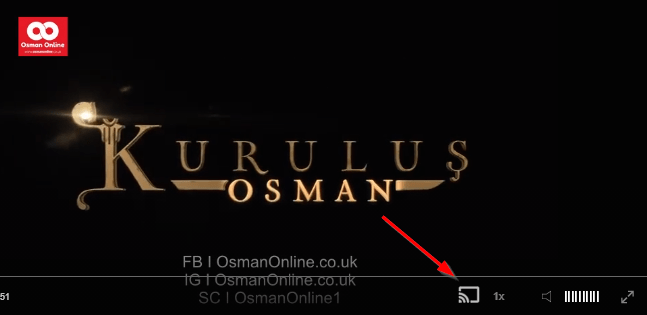
- click ‘Cast’ button (image below) on the lower edge of the video,
- select a TV to which you want to send the video
and video playback will start on your TV.
Note: Your TV and your phone, tablet, laptop or a PC need to be on the same network. It’s usually the case at home but, for example, if your phone is on mobile network and your TV is connected to your home network, casting button won’t show up on your phone because your phone doesn’t “see” your TV because they are not on the same network. In which case, simply connect your phone to your home network and reload the browsers page where the player is.
Clear cookies, clear cache, try a different browser.
Here’s a handy guide for most browsers.
Try using a different network. For example, if you have issues on your home network, you can try using your phone and it’s mobile network, in which case, your ISP is blocking the access to the video so maybe you should consider switching ISPs or using a VPS service.
Ramadan, Books and Old Friends
Ramadan begins, and Vefa tells his dervishes that its blessing lies in sharing. He sends food to Asim’s family and asks Salman to cook for the neighborhood every evening. Hatice Sultan arrives with their daughter and many books, and Kamil joins to help sort the Bursa volumes. Andreas returns the price of his freedom, and Vefa tells him he owes nothing. Then old Hazaroglu Effendi offers his shop. Vasily has plans for the holy month, and a familiar face from Hamit’s past turns up near the end with sharp words.
Mini FAQ
What happens in Vefa Sultan Episode 21?
The lodge in Sferaki is set on fire, Vefa answers with mercy and keeps building, and the Pasa orders a quiet search for the culprits. Ramadan begins, and Vefa finds a shop for his books.
Who burned the lodge in Vefa Sultan Episode 21?
The Pasa has no evidence yet. Vasily and his uncle speak as if they did it, saying they left no trace, and Vasily plans to sow discord among the Muslims during Ramadan.
Does Vefa get a bookshop in Episode 21?
Yes. After other owners refuse to sell, old Hazaroglu Effendi hands over his shop and also offers farmland outside the city. He asks Vefa to advise his grandson in return.
Watch all episodes of Vefa Sultan with English subtitles on OsmanOnline.live.
For more Turkish series like this, visit osmanonline.live to watch, and explore fascinating historical tales at osmanonline.me.