
Watch Haci Bayram i Veli Episode 10 With English Subtitles
Numan Efendi Clears His Name Before the Qadi – Haci Bayram i Veli Episode 10 with English Subtitles

Watch Haci Bayram i Veli Episode 10 with English Subtitles – Numan Efendi Clears His Name Before the Qadi
“Get to know yourself, Numan Efendi! Know yourself.”
Episode 10 of Haci Bayram i Veli opens with Numan Efendi stripped of his title and dressed as a beggar, while Somuncu Baba presses him to look inward instead of chasing his old rank. Kemal and Tatar are caught and questioned, and the matter ends up before the Qadi. Back at the Konak, Ayse Hatun carries worries of her own. This episode, with English subtitles, mixes Sufi teaching with courtroom tension and quiet family scenes.
Somuncu Baba Teaches Numan to Know Himself
Numan tells Somuncu Baba that he wishes to be alone, but Baba answers that no one can escape from himself. He reminds Numan that the Lord is closer than the jugular vein and urges him to know himself. Later, in the flour barn, Baba asks whether Numan loves the teaching itself or only the title of Mullah. He says Numan must first be a Mullah to his own Nafs, and that the state of nothingness is heavy only for someone who cannot bear it.
Confessions and the Court of the Qadi
Kemal and Tatar are tied up in the barn, and the followers press them to confess to the slander. At the court, Numan arrives to prove his innocence, and the Qadi says the man who set the trap has turned himself in. Tatar blames Mullah Rustem, and Rustem admits it. Numan argues that this was not a one-man job and that someone is sacrificing himself for the others. The Qadi tells him to weigh his words, and afterwards Baba reflects on the limits of human justice.


 Connect with us on SOCIAL MEDIA to catch up on the latest updates and be part of our growing community!
Full HD version bellow. Enjoy!
Terms used in this episode
- Efendi sir, master
- Molla Islamic scholar
- Şeyh spiritual leader of a Sufi order
- Kadı judge
- Medrese college of Islamic learning
- Hatun lady
- Bey lord, chieftain
- Amin amen
For any issues, please check our FAQ
Check if you have issues on all your devices (phone, tablet, laptop, PC…) or just your TV.
Different manufacturers (Samsung, LG and others) have different operating systems on which their TV’s run. Samsung uses Tizen while LG has webOS and they are not up to date with the latest standards in video playback.
That’s why we developed a player which supports casting feature.
If the video is playable on your other devices, try casting it to your TV.
In some cases casting icon doesn’t show up on the lower edge of the player to iPhone/iPad owners.
If you face such an issue, we recommend using Tubio app. It’s free and you can download it from App Store by clicking this link.
With it, you can cast any video from your iPhone/iPad to your TV.
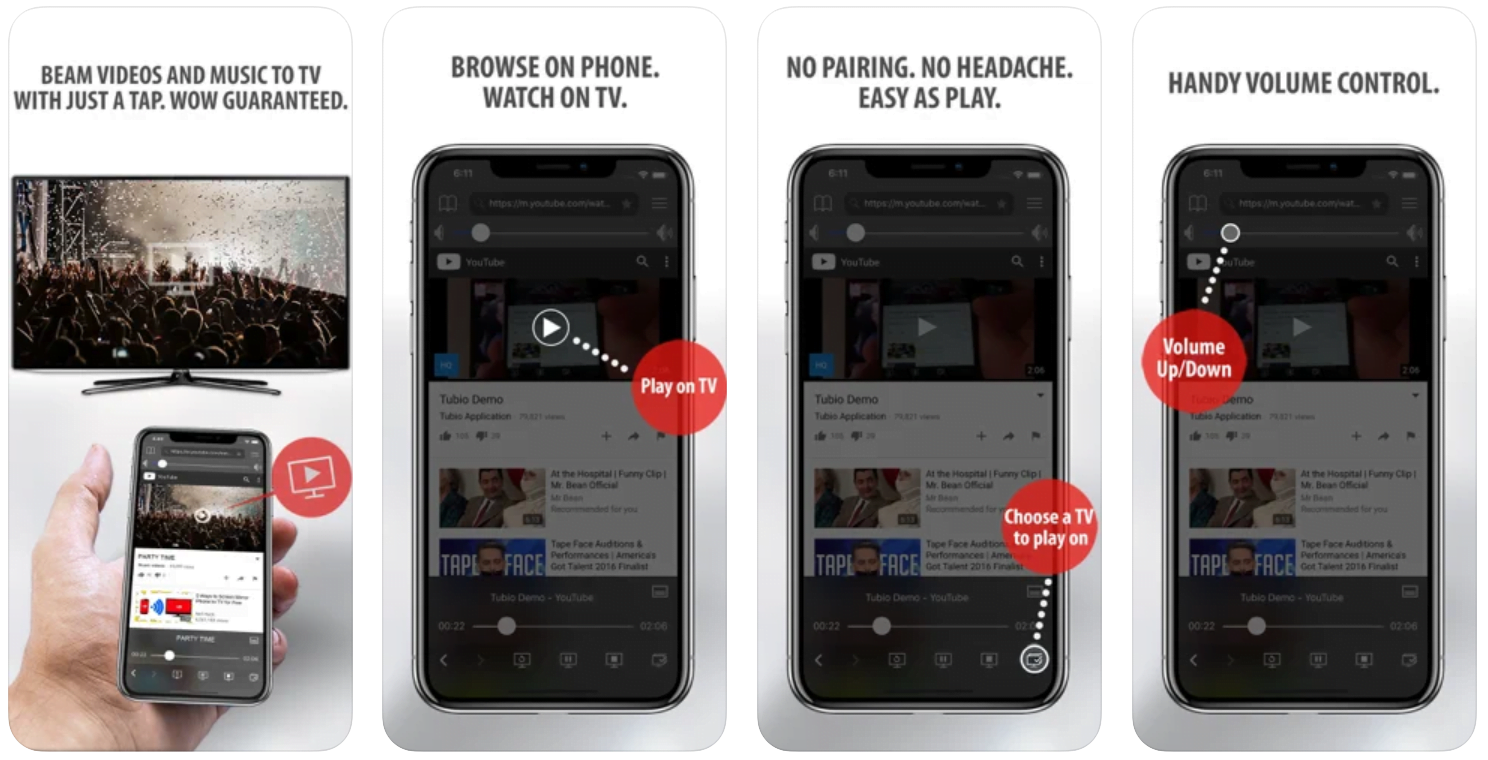
Yes it does! Our new player supports casting feature so you can easily cast the video from your phone/tablet/laptop or PC to your TV
Video casting is a feature which allows you to send (or cast) a video from your phone, tablet, laptop or a PC to your Smart TV or other Cast-enabled device (such as Smart TV’s, Chromecast and other devices with cast functionality).
It makes watching a video on your TV very convenient because you don’t have to use your TV’s browser (which are often not very user friendly) to find the video and play it on your TV.
Insted, you simply:
- find it on your phone, tablet, laptop or a PC,
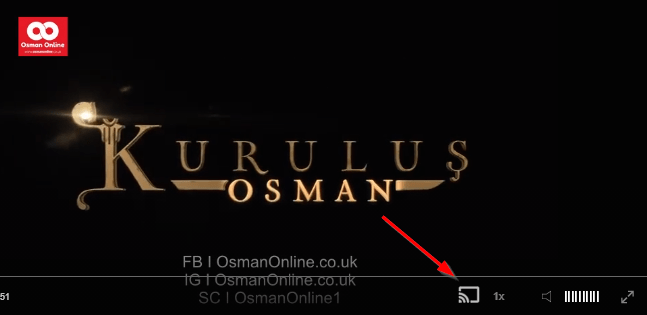
- click ‘Cast’ button (image below) on the lower edge of the video,
- select a TV to which you want to send the video
and video playback will start on your TV.
Note: Your TV and your phone, tablet, laptop or a PC need to be on the same network. It’s usually the case at home but, for example, if your phone is on mobile network and your TV is connected to your home network, casting button won’t show up on your phone because your phone doesn’t “see” your TV because they are not on the same network. In which case, simply connect your phone to your home network and reload the browsers page where the player is.
Clear cookies, clear cache, try a different browser.
Here’s a handy guide for most browsers.
Try using a different network. For example, if you have issues on your home network, you can try using your phone and it’s mobile network, in which case, your ISP is blocking the access to the video so maybe you should consider switching ISPs or using a VPS service.
A Banquet at the Konak and a Lesson in Patience
Earlier, Mevlut Bey comforts Ayse Hatun in the night, telling her not to be a burden but a beloved one. Later, he hosts a banquet where Numan is thanked and offered presents, and Ahmet recites folk poetry. Elsewhere the Sheikh teaches the story of Prophet Ayyub to his student Omer as a lesson in patience. By the end, the madrasa gathers, and Numan is asked to forgive those who wronged him as talk turns to the post of Head Professor.
Mini FAQ
Who is behind the plot against Numan Efendi in Haci Bayram i Veli Episode 10?
Tatar and Kemal are caught, and before the Qadi they point to Mullah Rustem, who admits he played the game to become Head Professor. Numan Efendi still says it was not the work of one man.
What does Somuncu Baba teach Numan in Episode 10?
He tells Numan to know himself, because a person cannot run away from himself and the Lord is closer than the jugular vein. He also asks whether Numan loves the teaching or only the title of Mullah.
Can I watch Haci Bayram i Veli Episode 10 with English subtitles?
Yes, Episode 10 is available to watch with English subtitles on osmanonline.live.
Watch all episodes of Haci Bayram i Veli with English subtitles on OsmanOnline.live.
For more Turkish series like this, visit osmanonline.live to watch, and explore fascinating historical tales at osmanonline.me.