Watch Aziz Mahmud Hudayi: Askın Yolculugu Episode 16 With English Subtitles
Mahmud Faces the Wild Horse of His Nafs – Aziz Mahmud Hudayi: Askın Yolculugu Episode 16 with English Subtitles

Watch Aziz Mahmud Hudayi: Askın Yolculugu Episode 16 with English Subtitles – Mahmud Faces the Wild Horse of His Nafs
“Its greatest trick is to disguise itself well.”
Episode 16 opens with heralds and cannon fire as a new Sultan, Murad, takes the Ottoman throne. Inside the lodge, Mahmud Effendi keeps up his hard fasting and breaks it with an apple only every three days, while the people around him grow worried. Sheikh Uftade speaks about the hidden tricks of the nafs, and then news about a new Qadi reaches Mahmud and tests him sharply. Watch the full episode of Aziz Mahmud Hudayi: Askın Yolculugu with English subtitles.
A New Sultan and Small Lessons at the Lodge
The heralds announce that Sultan Selim Khan has passed away and that Shahzade Murad has ascended the throne. Treats, banquets and 21 cannon shots are promised in his honor. Away from the proclamations, young Yusuf draws with Mansur Agha and dreams of engraving his own inventions like Master Al Jazari. He is introduced to Mehmed, who becomes his younger friend, and later explains a boat water clock to him. In the neighborhood, the Teacher agrees to begin Qur’an lessons for the children at her own home as soon as tomorrow.
The Wild Horse Called Nafs
Mahmud Effendi tells his Sheikh that he fights his nafs with dhikr and fasting, and he is given the task of cleaning the lodge. He grows pale, carries an apple on his belt and refuses the table his wife sets for him. She fears he will fall sick. When Muhammed voices the same worry, the Sheikh answers with the image of a wild horse. The stronger it is, the harder the struggle, and its best trick is to look defeated so the leash can be loosened.


 Connect with us on SOCIAL MEDIA to catch up on the latest updates and be part of our growing community!
Full HD version bellow. Enjoy!
Terms used in this episode
- Şeyh spiritual leader of a Sufi order
- Efendi sir, master
- Kadı judge
- Sultan sovereign ruler
- Hazret honorific, His Holiness
- Ağa chief, commander, elder
- Selamün Aleyküm Peace be upon you
- İnşallah If Allah wills
For any issues, please check our FAQ
Check if you have issues on all your devices (phone, tablet, laptop, PC…) or just your TV.
Different manufacturers (Samsung, LG and others) have different operating systems on which their TV’s run. Samsung uses Tizen while LG has webOS and they are not up to date with the latest standards in video playback.
That’s why we developed a player which supports casting feature.
If the video is playable on your other devices, try casting it to your TV.
In some cases casting icon doesn’t show up on the lower edge of the player to iPhone/iPad owners.
If you face such an issue, we recommend using Tubio app. It’s free and you can download it from App Store by clicking this link.
With it, you can cast any video from your iPhone/iPad to your TV.
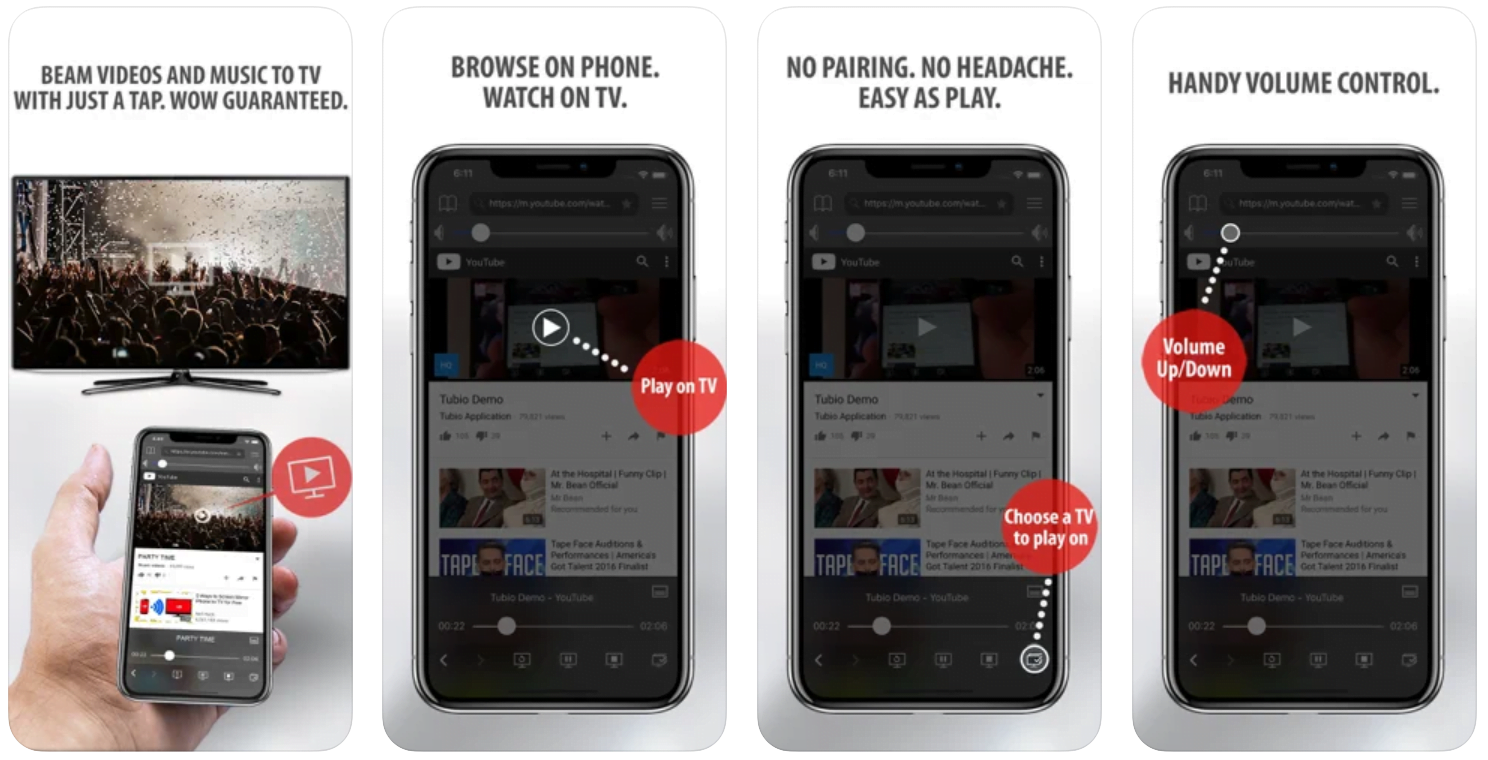
Yes it does! Our new player supports casting feature so you can easily cast the video from your phone/tablet/laptop or PC to your TV
Video casting is a feature which allows you to send (or cast) a video from your phone, tablet, laptop or a PC to your Smart TV or other Cast-enabled device (such as Smart TV’s, Chromecast and other devices with cast functionality).
It makes watching a video on your TV very convenient because you don’t have to use your TV’s browser (which are often not very user friendly) to find the video and play it on your TV.
Insted, you simply:
- find it on your phone, tablet, laptop or a PC,
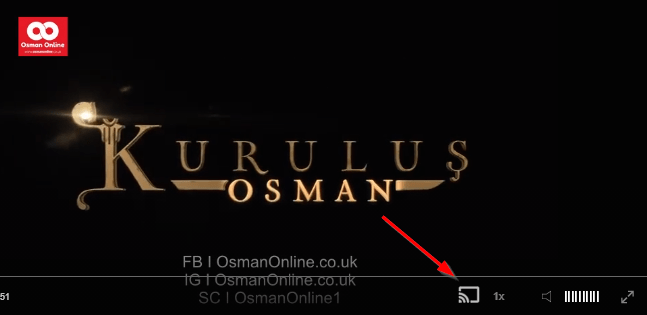
- click ‘Cast’ button (image below) on the lower edge of the video,
- select a TV to which you want to send the video
and video playback will start on your TV.
Note: Your TV and your phone, tablet, laptop or a PC need to be on the same network. It’s usually the case at home but, for example, if your phone is on mobile network and your TV is connected to your home network, casting button won’t show up on your phone because your phone doesn’t “see” your TV because they are not on the same network. In which case, simply connect your phone to your home network and reload the browsers page where the player is.
Clear cookies, clear cache, try a different browser.
Here’s a handy guide for most browsers.
Try using a different network. For example, if you have issues on your home network, you can try using your phone and it’s mobile network, in which case, your ISP is blocking the access to the video so maybe you should consider switching ISPs or using a VPS service.
Envy, Shame and a Hard Confession
In the bazaar a herald announces Konur Effendi, son of Duran, as the new Qadi of Bursa. Mahmud hears it, steadies himself with dhikr and goes to clean the loo, where an old envy rises and he scolds himself bitterly about his promise to the Sheikh. Meanwhile the Sheikh calms the troubled Beyoglu with linden tea and love, and Mahmud’s mother wakes from a frightening dream. By the end Mahmud brings his shame to the Sheikh, and the answer he receives is left for you to watch.
Mini FAQ
What happens in Aziz Mahmud Hudayi Episode 16?
A new Sultan, Murad, takes the throne and Bursa celebrates. Mahmud Effendi pushes his fasting to the limit, and news that Konur Effendi is the new Qadi stirs up a struggle with his nafs.
Where can I watch Aziz Mahmud Hudayi Episode 16 with English subtitles?
You can watch Aziz Mahmud Hudayi: Askın Yolculugu Episode 16 with English subtitles here on osmanonline.live.
Who is the new Qadi of Bursa in Episode 16?
A herald announces that the new Qadi of Bursa is Konur Effendi, son of Duran. He wears a khilat and swears an oath, and rice is cooked in honor of him and the new Sultan.
Watch all episodes of Aziz Mahmud Hudayi: Askın Yolculugu with English subtitles on OsmanOnline.live.
For more Turkish series like this, visit osmanonline.live to watch, and explore fascinating historical tales at osmanonline.me.