
Watch Imam Ghazali Episode 9 With English Subtitles
Ghazali Faces His Own Shadows in the Dark – Imam Ghazali Episode 9 with English Subtitles
Watch Imam Ghazali Episode 9 with English Subtitles – Ghazali Faces His Own Shadows in the Dark
“Knowledge is divine light if it is born from the heart.”
Episode 9 of Imam Ghazali opens in a dreamlike void where Ghazali hears voices, meets a shadow of himself, and is asked when he last listened to his own heart. Outside, Ahmad and Zainab Khatun worry about Salih and Ghazali, who cannot be found, while Seyyide Khatun faces an angry crowd at the zawiya. The episode moves between inner struggle and public suspicion, and it closes on a quiet note that raises new questions.
Ghazali in the Realm of Silence
Ghazali wakes in an unknown place and asks where he is and how he got there. A voice tells him he was not brought there, he surrendered himself, and that his passion for knowledge has blinded him. Doors open onto other versions of him, and a voice accuses him of writing, believing, forgetting and burning. Ghazali answers that he now hopes to awaken not through knowledge but through repentance and sincerity. He then insists that knowledge is divine light when it is born from the heart, and that this place stripped him of himself.
Ahmad, the Rose and the Sheikh
Ahmad tells his Sheikh that his brother Salih cannot be found and that Ghazali has not returned. The Sheikh answers that worry is like trying to catch unfallen rain in a bucket. Then Ahmad asks about the rose he gave and finds it withered. The Sheikh explains that a flower needs water, a watchful eye and sometimes silence, and that handing over a trust is not the same as keeping it. Ahmad admits he forgot and asks forgiveness. The Sheikh says he can forgive, but asks whether the rose will.


 Connect with us on SOCIAL MEDIA to catch up on the latest updates and be part of our growing community!
Full HD version bellow. Enjoy!
Terms used in this episode
- Şeyh spiritual leader of a Sufi order
- Efendi sir, master
- Zaviye Sufi lodge
- Derviş member of a Sufi order
- İnşallah If Allah wills
- Kadı judge
- Selamün Aleyküm Peace be upon you
For any issues, please check our FAQ
Check if you have issues on all your devices (phone, tablet, laptop, PC…) or just your TV.
Different manufacturers (Samsung, LG and others) have different operating systems on which their TV’s run. Samsung uses Tizen while LG has webOS and they are not up to date with the latest standards in video playback.
That’s why we developed a player which supports casting feature.
If the video is playable on your other devices, try casting it to your TV.
In some cases casting icon doesn’t show up on the lower edge of the player to iPhone/iPad owners.
If you face such an issue, we recommend using Tubio app. It’s free and you can download it from App Store by clicking this link.
With it, you can cast any video from your iPhone/iPad to your TV.
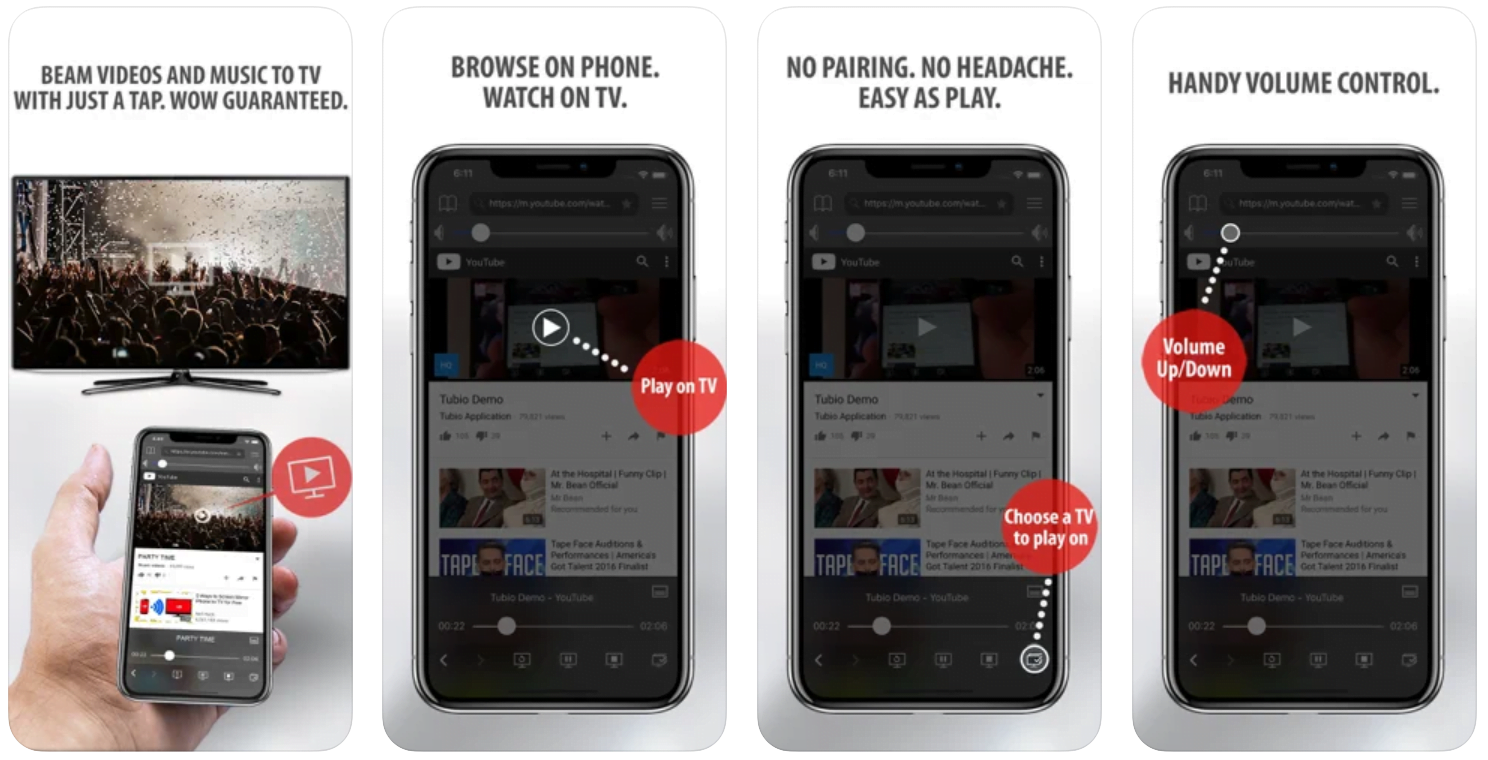
Yes it does! Our new player supports casting feature so you can easily cast the video from your phone/tablet/laptop or PC to your TV
Video casting is a feature which allows you to send (or cast) a video from your phone, tablet, laptop or a PC to your Smart TV or other Cast-enabled device (such as Smart TV’s, Chromecast and other devices with cast functionality).
It makes watching a video on your TV very convenient because you don’t have to use your TV’s browser (which are often not very user friendly) to find the video and play it on your TV.
Insted, you simply:
- find it on your phone, tablet, laptop or a PC,
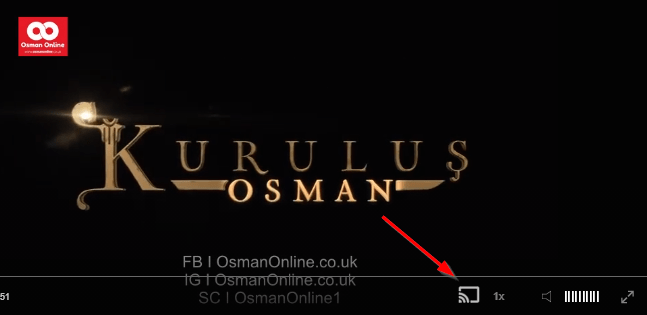
- click ‘Cast’ button (image below) on the lower edge of the video,
- select a TV to which you want to send the video
and video playback will start on your TV.
Note: Your TV and your phone, tablet, laptop or a PC need to be on the same network. It’s usually the case at home but, for example, if your phone is on mobile network and your TV is connected to your home network, casting button won’t show up on your phone because your phone doesn’t “see” your TV because they are not on the same network. In which case, simply connect your phone to your home network and reload the browsers page where the player is.
Clear cookies, clear cache, try a different browser.
Here’s a handy guide for most browsers.
Try using a different network. For example, if you have issues on your home network, you can try using your phone and it’s mobile network, in which case, your ISP is blocking the access to the video so maybe you should consider switching ISPs or using a VPS service.
Seyyide Khatun Answers the Crowd
An angry crowd gathers at the zawiya and accuses Seyyide Khatun of testifying for a murderer and hiding him. She replies that she saved a heart and her conscience, and that she offered her testimony to Allah. Some people defend her, while others admit they still carry doubt. Elsewhere, al-Juwayni visits Sheikh Nessac to ask about Ghazali and hears that he is safe, though some paths change the traveler. A shroud with a note is also left in front of the court, and the name Ghazali is spoken once it is read.
Mini FAQ
What happens to Ghazali in Imam Ghazali Episode 9?
Ghazali finds himself in a silent, dreamlike place where voices and versions of himself question his pride in knowledge. He ends up speaking of repentance and of knowledge that is born from the heart.
Where is Salih in Imam Ghazali Episode 9?
Nobody knows. Zainab Khatun says neither she nor Ahmad knows where he is, and Ahmad tells the Sheikh that no one has seen his trace or heard his voice.
Why does the crowd confront Seyyide Khatun in Episode 9?
They accuse her of testifying for a murderer and sheltering him at the zawiya where she teaches female students. She answers that she gave her testimony to Allah and not to them.
Watch all episodes of Imam Ghazali with English subtitles on OsmanOnline.live.
For more Turkish series like this, visit osmanonline.live to watch, and explore fascinating historical tales at osmanonline.me.